
Subscription
Settings → Subscription (also reachable at the subscription URL in the app)
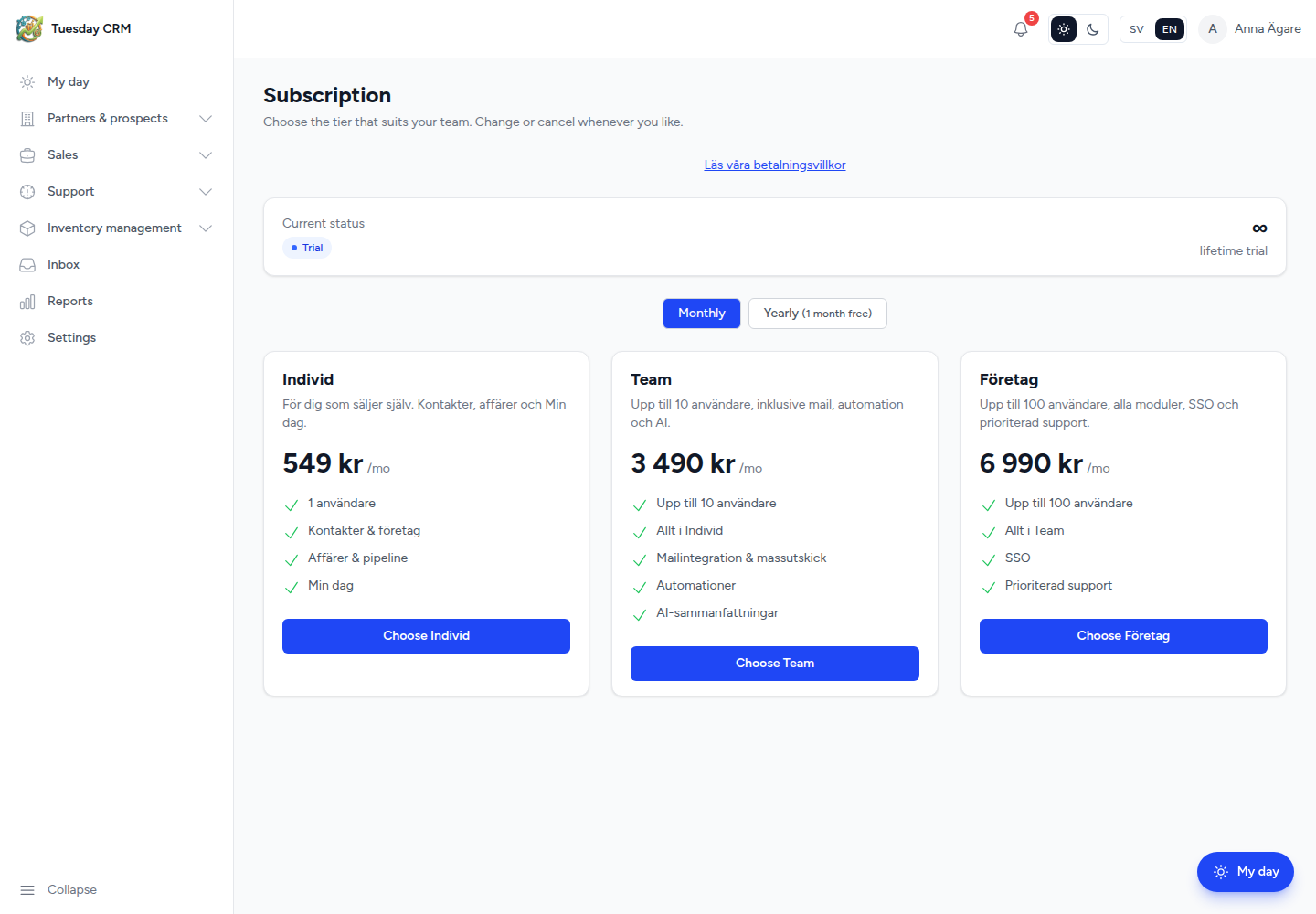
View your trial or paid plan and choose a tier. Choose the tier that suits your team. Change or cancel whenever you like.
Who can open this
CEO and Administrator by default. Other roles only if granted the card.
This page stays available when a trial has expired, so an admin can renew even if the rest of Tuesday is locked.
Current status
The top card shows whether you are on a trial or a paid plan, and how many days left of the trial period you have (or lifetime trial on some accounts).
Choose a plan
- Toggle Monthly or Yearly. Yearly is labeled with the discount (for example 1 month free).
- Compare the plan cards (features and price, shown as
/moor an annual amount). - Click Choose … on the plan you want, or Current plan if you are already on it.
If Stripe is configured, Tuesday sends you to a secure checkout. If keys are missing in that environment, you will see that payment is temporarily disabled.
A Terms / payment terms link is available on the page when your operator publishes one.
If you are not an admin and the trial ended
You stay signed in but see: The trial period has ended. Ask a CEO or Administrator to open Subscription and renew, or log out and use another account.
← Settings